
MCP Server
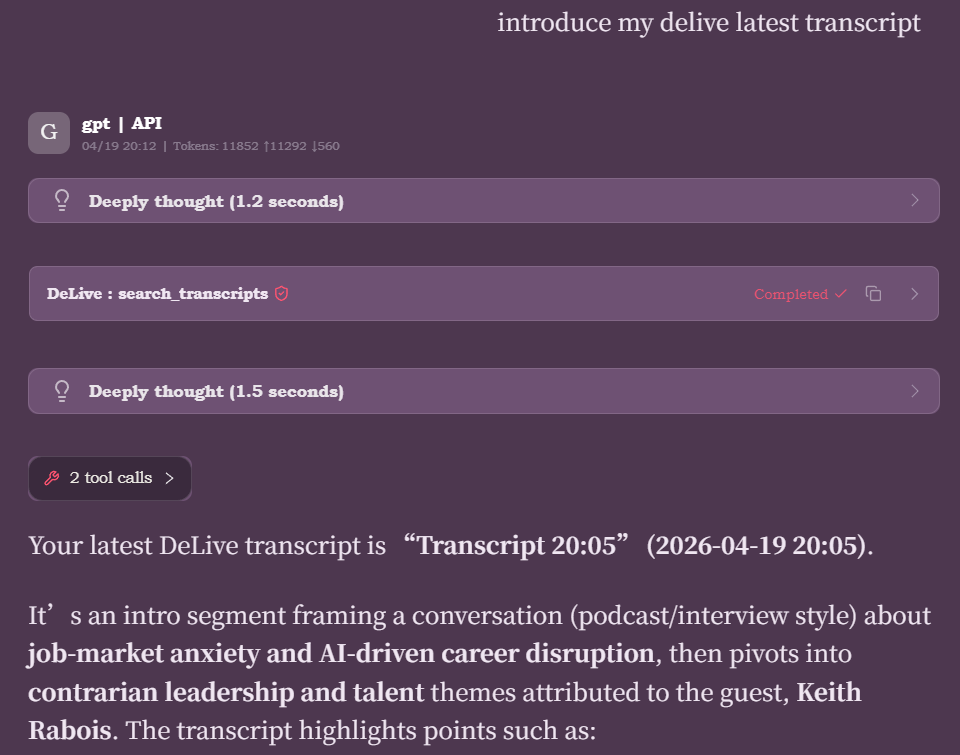
DeLive includes a standalone MCP (Model Context Protocol) server that exposes transcription data as tools and resources for AI agents like Claude Desktop, Cursor, and Claude Code.
Architecture
The MCP server is a lightweight Node.js script (mcp/delive-mcp-server.js) that:
- Runs as a child process launched by the MCP client (e.g. Claude Desktop)
- Uses stdio transport (standard MCP protocol)
- Calls DeLive's REST API on
http://localhost:23456to fetch data - Translates MCP tool calls into HTTP requests and formats responses
MCP Client (Claude Desktop)
    ↕ stdio
DeLive MCP Server (node process)
    ↕ HTTP
DeLive App (Electron, port 23456)
Setup
Prerequisites
- DeLive running with Open API enabled (Settings > General > Open API)
- Node.js 18+
- MCP server dependencies installed:
cd mcp && npm install
Environment Variables
| Variable | Default | Description |
|---|---|---|
DELIVE_API_URL | http://localhost:23456 | DeLive REST API base URL |
DELIVE_API_TOKEN | (empty) | Bearer token for authentication (set in DeLive Settings) |
Client Configuration
Claude Desktop / Claude Code
Add to your Claude Desktop MCP config (claude_desktop_config.json):
{
  "mcpServers": {
    "delive": {
      "command": "node",
      "args": ["C:/path/to/DeLive/mcp/delive-mcp-server.js"],
      "env": {
        "DELIVE_API_URL": "http://localhost:23456",
        "DELIVE_API_TOKEN": "your-token-from-settings"
      }
    }
  }
}
Cursor
Add to .cursor/mcp.json (project-level) or ~/.cursor/mcp.json (global):
{
  "mcpServers": {
    "delive": {
      "command": "node",
      "args": ["C:/path/to/DeLive/mcp/delive-mcp-server.js"],
      "env": {
        "DELIVE_API_URL": "http://localhost:23456",
        "DELIVE_API_TOKEN": "your-token-from-settings"
      }
    }
  }
}
Cherry Studio
- Open Settings > MCP Servers > Add.
- Select stdio type.
- Fill in the fields:
- Command:
node - Args:
C:/path/to/DeLive/mcp/delive-mcp-server.js - Env:
DELIVE_API_URL=http://localhost:23456,DELIVE_API_TOKEN=your-token
- Command:
- Save and enable the toggle.
OpenAI Codex CLI / Other MCP Clients
Any MCP client supporting stdio transport can launch the server directly:
DELIVE_API_URL=http://localhost:23456 \
DELIVE_API_TOKEN=your-token \
node /path/to/DeLive/mcp/delive-mcp-server.js
Tools
search_transcripts
Search sessions by keyword in title or transcript content.
| Parameter | Type | Required | Default | Description |
|---|---|---|---|---|
query | string | yes | — | Search keyword |
limit | number | no | 10 | Max results |
get_session
Get full session detail including transcript, corrected transcript (when available), AI summary, mind map, and Q&A history.
| Parameter | Type | Required |
|---|---|---|
sessionId | string | yes |
get_session_transcript
Get transcript text only (lightweight). Includes corrected transcript when AI correction has been applied.
| Parameter | Type | Required |
|---|---|---|
sessionId | string | yes |
get_session_summary
Get AI summary, action items, keywords, and mind map.
| Parameter | Type | Required |
|---|---|---|
sessionId | string | yes |
get_recording_status
Check if DeLive is currently recording and get app status.
No parameters.
list_topics
List all topic categories.
No parameters.
list_tags
List all tags used to label sessions.
No parameters.
Resources
| URI | Description |
|---|---|
delive://sessions/recent | Most recent 10 sessions (metadata) |
delive://status | Current app and recording status |
Error Handling
| Scenario | MCP Error Message |
|---|---|
| DeLive not running | "DeLive is not running or API is unreachable. Please start DeLive first." |
| API disabled | "DeLive Open API is disabled. Enable it in DeLive Settings > Open API." |
| Invalid token | "DeLive API token is invalid. Set the correct DELIVE_API_TOKEN environment variable." |
| Request timeout | 10-second timeout on all HTTP calls |
Dependencies
{
  "@modelcontextprotocol/sdk": "^1.29.0",
  "zod": "^4.3.6"
}